


For sellers in Saudi Arabia

All your stores and ads, under one sky.

See what's really left after platform fees and ad spend. Orders, stock, prices and payouts from Salla, noon, Amazon, Trendyol, eXtra and Komrz, in one account.

Start your 7-day free trialExplore the live demo

  • Charged on day 8 only if you don't cancel
  • Your stores change only when you do it or set it up
  • Disconnect any time
  • Support by email

Sign up here and connect all your stores and ad accounts (for VAT-registered businesses)Selling on Salla? You can also start there: Install from the Salla App Store

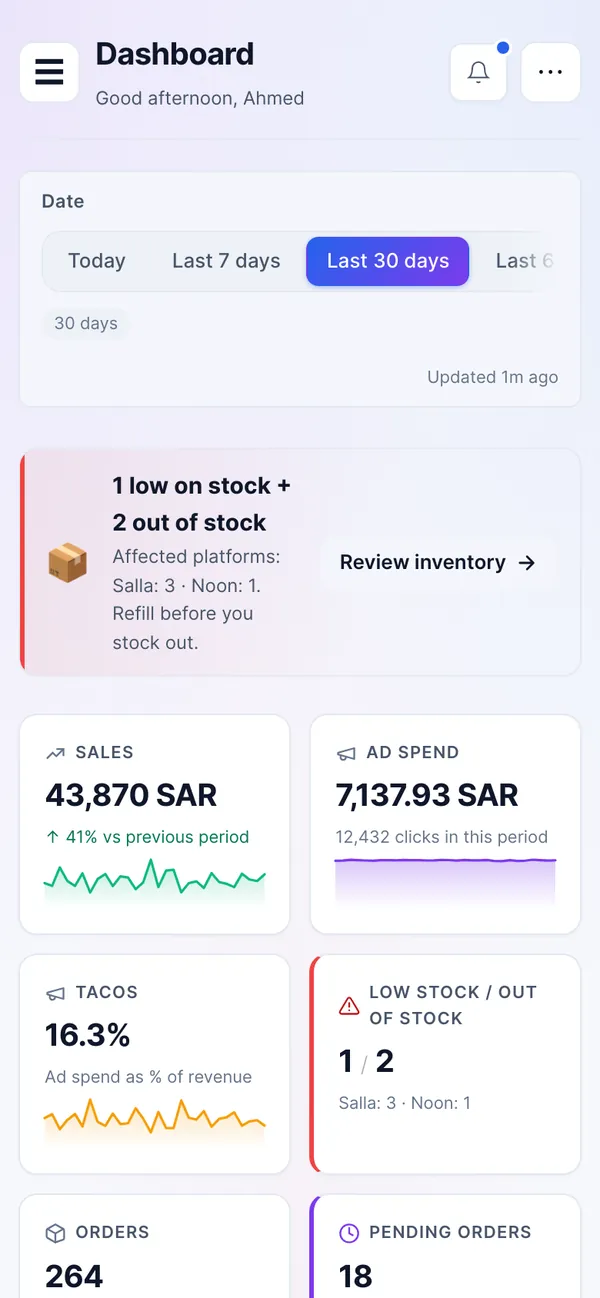
The Dashboard in our system: sales, orders, ad spend and stock alerts from every storeThe Dashboard in our system: sales, orders, ad spend and stock alerts from every store
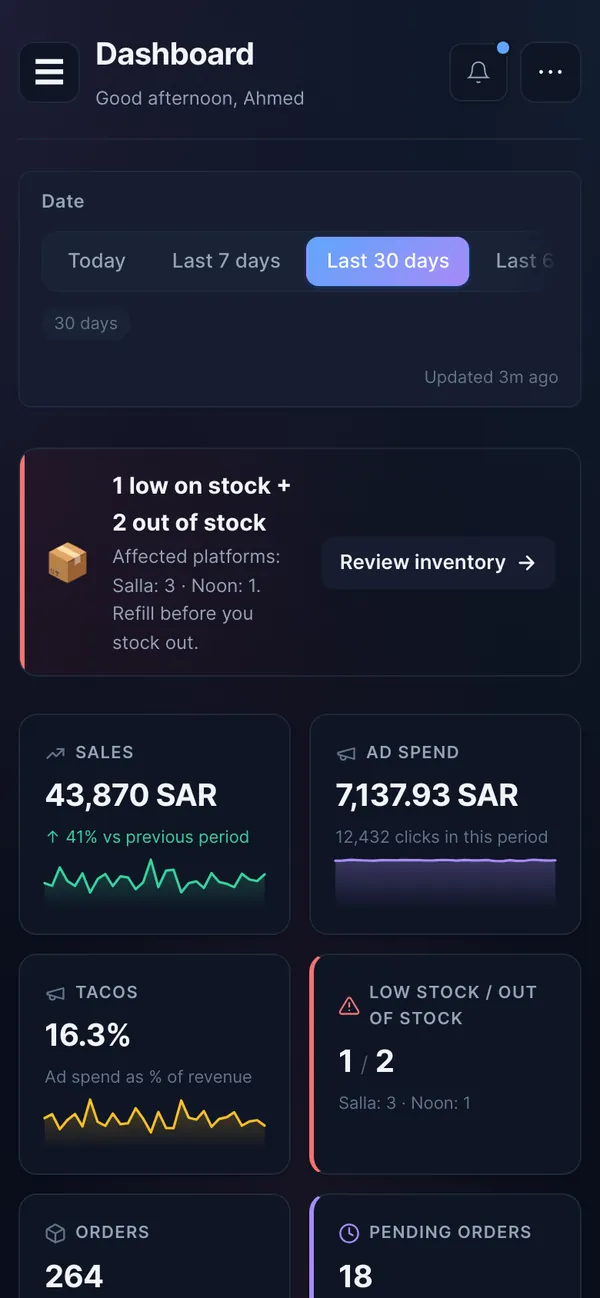
The Dashboard on a phoneThe Dashboard on a phone

Sample data from the live demo.

  • 6Stores in one account
  • 5Ad platforms in one report
  • 15minStore refresh

One account for every store and ad platform

Stores

  • Salla
  • noon
  • Amazon
  • Trendyol
  • eXtra
  • Komrz

Stores

  • Salla
  • noon
  • Amazon
  • Trendyol
  • eXtra
  • Komrz

Ads

  • Amazon Ads
  • Google Ads
  • Meta
  • TikTok
  • Snapchat

Ads

  • Amazon Ads
  • Google Ads
  • Meta
  • TikTok
  • Snapchat

Connect each one once. From then on, everything updates on its own.

6 stores, 5 ad platforms, one account.

What changes on your first day.

Before

  • 6 store and 5 ad dashboards
  • Stock that stops matching between stores
  • Prices changed one store at a time
  • Ad reports that count one sale twice

With SellerLink

  • One account for every store and ad platform
  • Change stock once, every store updates
  • Prices from one screen, with revenue after fees
  • Ad spend against your real sales

A look inside our system

Real screens from the app, with sample data, not a customer's.

Close-up of the Finance page: sales, platform fees and where your money goesClose-up of the Finance page: sales, platform fees and where your money goes

Money summary

Sales aren't what you keep. Now you know what is.

Sales minus platform fees and ad spend, for every store.

  • What's left, as an amount and a share of sales
  • Each store's fee %, actual or estimated
  • Product cost isn't included, so you know what the figure means

What's left after fees and adsSample data

  • SalesSAR 130,800
  • Platform feesSAR 14,422
  • Ad spendSAR 17,100
  • What's leftSAR 99,278
More about this
Close-up of the All Ads page: total spend, Amazon Ads sales and ACOS, and each platform's share of spendClose-up of the All Ads page: total spend, Amazon Ads sales and ACOS, and each platform's share of spend

Ads analytics

5 ad platforms. One report.

Every platform's spend, measured against your real sales.

  • TACOS: ad spend against all your store sales
  • Sales from ads and ACOS where purchases are real, never counted twice
  • An alert when spend or ACOS passes your limit

Ad spend by platform, last 7 daysSample data

  • MetaSAR 707
  • TikTokSAR 455
  • Amazon AdsSAR 258
  • Google AdsSAR 245
  • SnapchatSAR 120
More about this
Close-up of the Inventory page: one product's total stock, and what Salla, noon and Trendyol showClose-up of the Inventory page: one product's total stock, and what Salla, noon and Trendyol show

Stock

Change stock once. Every store updates.

Sizes, colours and noon's warehouses included.

  • Split stock, or one Total share for every store
  • A warning when a store shows a different number
  • AI links the same product across your stores

Stock on each storeSample data

Total 110

  • Salla30
  • noon30
  • Trendyol30
More about this
Close-up of the Payouts page: what each marketplace will transfer to youClose-up of the Payouts page: what each marketplace will transfer to you

Payouts

When does my money arrive? Now you know.

Upcoming transfers from Amazon, noon, Trendyol and eXtra on one page.

  • Amounts and dates read directly from each marketplace
  • Fees and invoices to be deducted, line by line
  • Your recent transfers, all in one place

Upcoming payoutsSample data

  • TrendyolSAR 13,068
  • eXtraSAR 6,126
  • AmazonSAR 6,121
  • noonSAR 4,385
More about this

See every feature

Take the tour

Click through the screens sellers use every day.

The Orders page: every order from every store in one list, with filtersThe Orders page: every order from every store in one list, with filters
Every order from every store, in one list.

Orders per daySample data

264

Up and running in three steps

  1. Connect your stores

    Link each store and ad account once, in a few steps or through the store's own approval screen.

  2. Let AI link your products

    AI matches the same product across your stores, in Arabic and English. You can review and change any link.

  3. Work from one screen

    Orders, stock, prices and ads in one place, refreshed on their own.

Built for sellers in Saudi Arabia

Trust comes from how it works, not from slogans.

Official connections

Each store and ad account connects through the platform's own access, and you can disconnect at any time.

Your customers' details stay out

Names, emails, phone numbers and addresses are removed from each order before anything is saved.

A free setup session

Every subscriber gets a free setup session: our team connects your stores and links your products with you.

7 days free

Charged on day 8 only if you don't cancel. Cancel any time from Settings.

  • Full Arabic, right to left, and English
  • Amounts in Saudi riyals
  • Works in your phone's browser
  • Your team, with the right access: admin, member or viewer

Connects to where you sell and advertise

Simple monthly plans

Start with a 7-day free trial. Prices exclude VAT, are shown in US dollars and are billed in Saudi riyals.

Sign up here and connect all your stores and ad accounts (for VAT-registered businesses)Selling on Salla? You can also install SellerLink from the Salla App Store

Basic

All your stores in one place

$53 / month(SAR 199)

For sellers who want every store in one place, without ads.

Start free trial

Ads

Every ad platform, one report

$53 / month(SAR 199)

For advertisers who want every ad platform in one report. No store needed.

Start free trial

Recommended

Plus

Stores and ads under one login

$106 / month(SAR 399)

For sellers who sell and advertise, in one account.

Start free trial

Intelligence

The full platform, with AI on demand

$160 / month(SAR 599)

For growing teams that want AI reports on demand and every alert routed.

Start free trial

Agency / Enterprise · Unlimited users and dedicated onboarding.

Contact us

See all plans

Questions sellers ask

How do I connect my stores?

From the Linking page, in a few steps or through the store's own approval screen. You connect each store once, and after that your data refreshes on its own. You can disconnect at any time.

Does it change anything in my stores on its own?

Only changes you make or set up yourself: a stock or price change you save, Total share lowering stock after an order, or a scheduled price. It never changes anything else.

Is my data secure?

Your stores and ad accounts connect through each platform's official connection, and the access keys are stored encrypted. Your customers' names, emails, phone numbers and addresses are removed from each order before anything is saved. Your data is used only to provide and improve your service, and is shared only with the providers needed to run it or when the law requires. See the Privacy Policy and the Data Deletion Policy.

How does the free trial work?

You get 7 days free. You add a card when you sign up, and you're charged for the plan you chose when the trial ends, unless you cancel first. The free trial is available once per account.

What is TACOS, and why does the Dashboard show it?

TACOS is your total ad spend as a share of your total store sales over the same dates. Each ad platform counts the sales it links to its own ads, and two platforms can claim the same order, so their own reports can make ads look better than they are. TACOS uses your real store sales instead, so sales that didn't come from ads count too. The Dashboard shows it next to your ad spend and on the trends chart, and warns you when ads take more than 30% of your sales. It needs your stores and your ad accounts connected, so it comes with Plus and higher.

Can I get a refund?

Yes: you can ask for a full refund within 2 days after your trial ends. After that, payments are not refunded, and a cancellation takes effect at the end of the period you've paid for. See the Refund Policy.

All questions

See your whole business in one place

Explore the live demo with sample data, or start your 7-day free trial.

Start your 7-day free trialExplore the live demo

Need help getting started, or have bigger needs? Talk to our team

Start free trial